Aline is a Chrome Extension that gives you Photoshop-style guides in your browser. Unfortunately, if you are developing a visual web product on localhost, you will not have access to this handy tool because Chrome Extensions do not work on local environments.
Here is a way around that pesky limitation using Ngrok. Ngrok allows you to serve your localhost through a private tunnel to a public URL. On this public URL, you can use Chrome Extensions. Here is how to set the servers up:
- Download Ngrok from its website .
- Extract the download into your project folder
- Open 2 terminals into your project folder
- In Terminal A, run ‘python -m SimpleHTTPServer’, which will serve to localhost:8000
- In Terminal B, run ‘./ngrok http 8000’
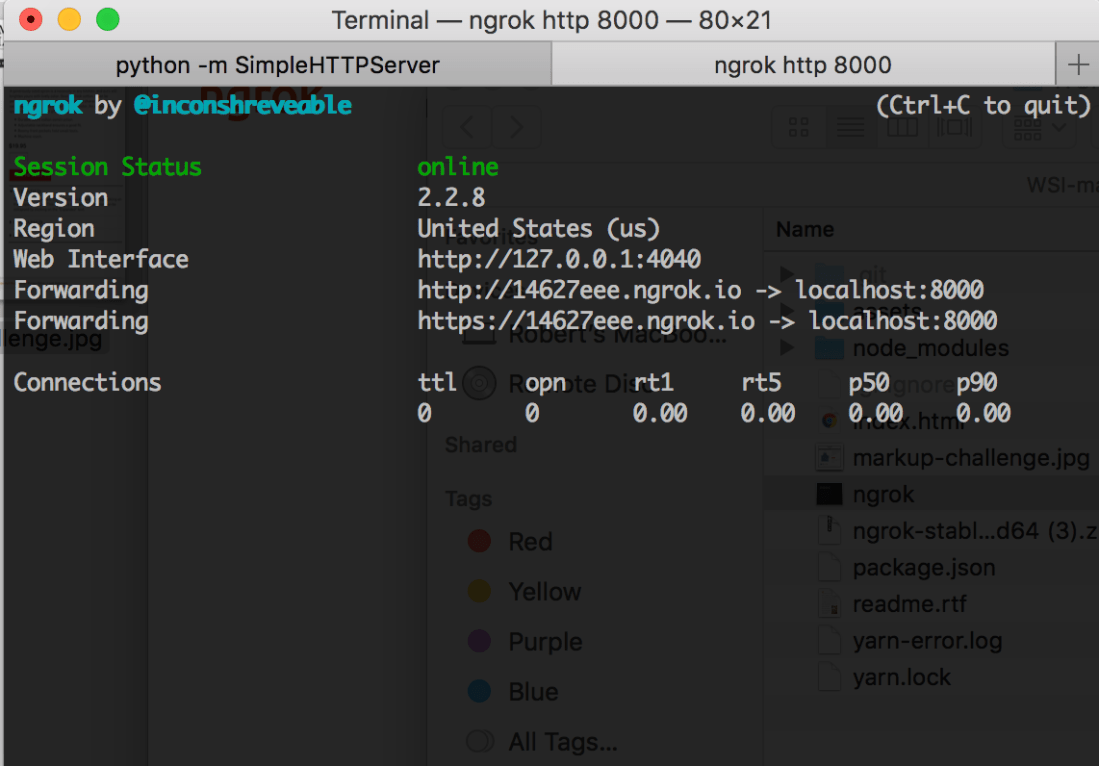
- The log from Terminal B should look like the above image
- Navigate to the ‘http’ protocol URL, and you should see your localhost:8000 content. The private tunnel is complete!
- Now you can use that handy Aline Chrome Extension for your layout.
Thanks for reading!

 talamantez.js